
The return of the Hybrid Sid Player by xAD/Nightfall & Gianluca Renzi (RetroBit Lab)
Based on the Project and Hardware Schematic by Markus Gritsch released in the years 2011-2015 on the forum dangerousprototypes. Thanks Markus.
Changelog:
v1.19 – 22/5/2022
Added:
- Added the horizontal scroll of the sid filenames list.
- The maximum allowed length of the sid file including extension is 48 characters, the small oled can display a maximum of 20 characters, so this feature is useful with very long file names. The function is activated with the MODE key when you are in browsing files mode, once the 48 characters are reached, the scroll resets and repositions the display of the file from the beginning until the next pressing of the MODE key.
Updated:
- Added a new parameter to the configuration file (config.ini).
- Choose the default SID Socket on bootup. This configuration is not mandatory.
Below is an excerpt from the “config.ini” file.
# Choose the default SID Socket on bootup (1:Socket #1 – 2:Socket #2) – default: 1
DEFAULT_SID_SOCKET=1
Fixed:
- Wrong emulation for the NOP opcode. %-)
- I noticed this problem with a SID made by Hermit of Samar Productions, SIDRIP Alliance, Singular that uses a SID Player written by him. SID Tune: MSK Cover-XF End (https://csdb.dk/release/?id=214247) This SID Player uses several illegal opcodes and i immediately thought of an emulation problem of these illegal opcodes, instead it was the NOP opcode that had problems. I point out that i listen at random 7XX favorite songs at least 1 hour a day and i never noticed any problems. :-D Anyway, Fixed.
- Max entries per directory.
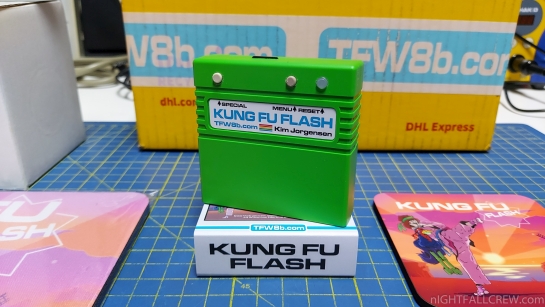
A new version of the firmware for the Kung Fu Flash Cartridge by Kim Jørgensen is released.
Changelog:
- Fix timing problems on some C64s (since v1.38). Thanks chris
Note:
Disk emulation is now active by default when launching PRGs. If this is not desired or if the PRG requires EF3 USB support then the old load option is still available in the file options menu (shift+return or long press fire).
A lot of changes has been made to optimize the C64/KFF communication. Please let me know if you detect any broken functionality in this release
Download:
source: github.com/KimJorgensen/KungFuFlash
A new version of the firmware for the Kung Fu Flash Cartridge by Kim Jørgensen is released.
Changelog:
- Improve disk write support.
- Optimize SD card access.
- Small performance optimizations.
Note:
Disk emulation is now active by default when launching PRGs. If this is not desired or if the PRG requires EF3 USB support then the old load option is still available in the file options menu (shift+return or long press fire).
A lot of changes has been made to optimize the C64/KFF communication. Please let me know if you detect any broken functionality in this release
Download:
source: github.com/KimJorgensen/KungFuFlash
A new version of the firmware for the Kung Fu Flash Cartridge by Kim Jørgensen is released.
Changelog:
- Optimize VIC-II read access for ultimax cartridges (issue #94)
- Disk emulation support large PRGs
- Improve disk emulation loading speed
- Load and mount is now default for PRGs
Note:
Disk emulation is now active by default when launching PRGs. If this is not desired or if the PRG requires EF3 USB support then the old load option is still available in the file options menu (shift+return or long press fire).
A lot of changes has been made to optimize the C64/KFF communication. Please let me know if you detect any broken functionality in this release
Download:
source: github.com/KimJorgensen/KungFuFlash
A new version of the firmware for the Kung Fu Flash Cartridge by Kim Jørgensen is released.
Changelog:
- Support VICE v2.0 CRT file format (C64 and C128)
- Support WarpSpeed 128
Download:
source: github.com/KimJorgensen/KungFuFlash
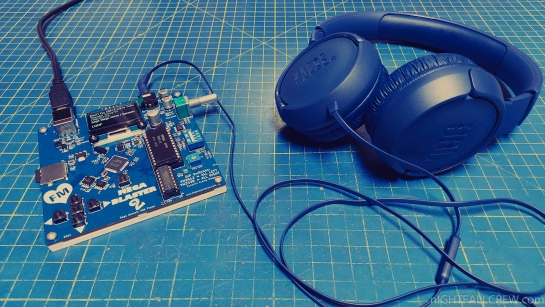
A new version of the firmware for the Mega Blaster 2 by Aidan Lawrence is released.
The Mega Blaster 2 by Aidan Lawrence is a hardware Sega Genesis/Mega Drive video game music (VGM) player that utilizes the real sound chips.
Changelog from version v0.1 to 1.28:
- 1.28: This firmware update fixes two things:
- The PSG frequency register now updates when only the low-byte is written to. This is uncommon on VGM files for “real” genesis games, but occasionally occurs on some homebrew tracks, causing the PSG to sound out-of-tune or flat out incorrect. Thank you to @natarii for solving that issue and graciously sharing your solution.
- FM channel muting has been fixed. Previous versions were targeting incorrect key-on registers.
- 1.27: Added a new sync-tone feature.
- For users looking to sync-up individual channel audio streams in their external recording software, this update adds a “Sync-tone” feature that may give you a helping hand.
- When the sync-tone feature is enabled, every unmuted FM and PSG channel will emit three tones on and off, 250ms between each key on/off. Then, 250ms later, the track will start. The YM2612/3438 use FM Channel 6 for PCM samples sent to the DAC, therefore, you can sync the PCM track using Channel 6.
- This update is handy for syncing up oscilloscope videos. You can mute all but one sound chip channel at a time, record your ‘scope video, then do the same for each channel. The sync-tone will help you find the starting point of each stream, even if a particular channel is muted at the start of a soundtrack.
- Pro tip: The PSG’s 3rd square-wave channel and noise channel will interact with one another if they are both un-muted at the same time. If both channels are active when the sync-tone is played, the PSG may sound detuned or inconsistent. It’s recommended to only have either the 3rd square wave channel OR the noise channel un-muted at a time.
- 1.26: Fixed DAC stream playback.
- 1.25: Fixes shuffle RNG.
- Music player used to select the same sequence of songs every time. This patch correctly calls the built-in true random number generator (TRNG) on the microcontroller to generate new random sequences of songs on every boot.
- 1.24: New Feature: Individual channel muting for both FM and PSG courtesy of @renedare
- You can toggle each FM and PSG channel individually by going to the new “Channel Control” menu by scrolling down the Main Menu.
- There, you can toggle each individual channel “ON” and “OFF.”
- If you’ve ever wanted to deconstruct a Genesis soundtrack into it’s constitute instruments, this update is for you!
- This feature is experimental, but works quite well already.
- DAC streams and PCM samples are played out of FM Channel 6.
- 1.23: OPTIONAL
- This firmware allows for SI5351(A) variant clock generators to be used. This new firmware will detect if your unit is using a SI5351 or SI5351A clock generator and will configure it automatically. These devices are functionally identical but have different I2C addresses. There’s no difference in performance between these two parts.
- This change was made to allow for component choice flexibility given the current electronics component shortage occurring as of mid-2021.
- 1.22: Fixed the following bugs:
- Folders with a large number of files incorrectly reported their index, causing strange out-of-order issues while in the “IN_ORDER” playback mode.
- “SHUFFLE_ALL” and “SHUFFLE_DIR” playback modes had a couple of issues regarding file indexing as well, causing the player to overflow it’s random file history list and subsequently pick invalid file indexes when traversing through the random track history.
- Random track history has been extended to 20 tracks; up from 5.
- 1.21: Prevent writing to the OPN2 test registers (0×21 and 0x2C)
- Some broken VGM files will write to these registers and cause huge distortion issues. This is technically an illegal operation and by blocking these writes, a few common broken VGM packs now function correctly, such as:
- Rocket Knight Adventures
- Comix Zone (also has some minor messed up PCM stuff, but that’s in the domain of the VGM author, not my player)
- 1.2:This new patch fixes a bug that prevented sequential folders beginning with the same substring from being opened correctly. Thanks to Bill over at the SdFat project for the help!
- 1.1: The manifest system has been removed in favor of a dynamic system at the expense of a bit more compute time and RAM usage.
- The manifest system was fairly slow and unreliable, especially when the SD card was filled with lots of files.
- You will no longer have to wait at startup for the manifest to build or verify itself.
- I’ve also put in a check for useless meta folders like System Volume Information and .DS_Store
- If these are found on the root directory, the are removed on boot. If these meta files are found after entering a directory, they will be removed after selecting a track. These may still show up in your file menu temporarily, but should go away after a refresh and never appear again unless the SD card is re-written to.
- 1.0: Double-tap the RESET button and drag the firmware.uf2 file onto the “drive” that pops up on your computer to flash!
- 0.1: The very first firmware release! Here’s to the future!
Download: Mega Blaster 2 v1.28 (706)
source: github.com/AidanHockey5/MegaBlaster2 aidanlawrence.com

The return of the Hybrid Sid Player by xAD/Nightfall & Gianluca Renzi (RetroBit Lab)
Based on the Project and Hardware Schematic by Markus Gritsch released in the years 2011-2015 on the forum dangerousprototypes. Thanks Markus.
Changelog:
v1.18 – 28/1/2022
Fixed:
- When you are in Manual mode of playing SID the timeout timer wrongly are also increased into a variable but this timer works only for the modes: auto/random/intro.
- Wrong STATIC variable for the debug via serial. the serial debug don’t works correctly in some part of the code. %-)
- Wrong variable for the Timeout check if the time is longer then 99 seconds. %-)
Updated:
- Freed and remapped to another destination the MCU pins of PAUSE and FFWD buttons to use them with the CS for the SID #2 and R/W because we needed 2 MCU pins 5v tolerant and there aren’t many left :/
- Described some parts of the source code.
- Added new parameters to the configuration file (config.ini).
- Playback timeout in seconds of the .SID files for AUTO/RANDOM and INTRO modes.
- Configure the best baudrate for the debug via Serial.
- Disable or Enable the visualization of the VU-METER for the 3 sid voices.
Below is an excerpt from the “config.ini” file.
# Serial Debug Baudrate – default: 115200
SERIAL_BAUDRATE=115200
# Set the Timeout in Seconds for the AUTO/RANDOM playing mode – default: 2 minutes
AUTORND_TIMEOUT=120
# Set the Timeout in Seconds for the INTRO playing mode – default: 15 seconds
INTRO_TIMEOUT=15
# Write 0 if you want to disable the visualization of the vu-meter for the 3 x sid voices.
# Default: 1
SID_VUMETER=1
A new version of the firmware for the Kung Fu Flash Cartridge by Kim Jørgensen is released.
Changelog from version v1.21 to 1.34:
- Fix broken mount D64 file option (since v1.33)
- Improve disk drive emulation to support Sidplay64. Thanks Actarus, Fabuseta, mwedmark, and Seni1ix
- Support basic SD2IEC commands.
- Optimized code to make it all fit in flash.
- In this version the following cartridge types will not require the firmware file on the SD card:
- Normal cartridge (8k, 16k, Ultimax)
- Fun Play, Power Play
- Super Games
- Ocean type 1
- Epyx Fastload
- C64 Game System, System 3
- Dinamic
- Zaxxon, Super Zaxxon
- Magic Desk, Domark, HES Australia
- EasyFlash
- Prophet64
- RGCD, Hucky
- Drean
- C128 Normal Cartridge (external function ROM)
- Combined PAL and NTSC firmware.
- T64 support (normal tape files only). Thanks Matthias.
- The firmware has been extended to support both PAL and NTSC and this requires the KungFuFlash_v1.30.upd file to be kept in the root directory of the SD card.
- Older firmware will not support this extended format so KungFuFlash_v1.30_upgrade.upd must be used first. This file is not needed after the upgrade process has been completed.
- Fix broken EasyFlash VIC-II/C128 mode. Thanks mrr19121970.
- Improve detection of C64 clock signal.
- Add simple diagnostic tool.
- The diagnostic tool is started by pressing the menu button for 2 seconds (until the LED turns off) and is intended to help debug stability problems on some C64 models.
- The tool can also be started in a USB only mode if Kung Fu Flash refuses to start at all. In this mode debug data is send via USB only and the C64 should start normally (boot to Basic). This mode is started by pressing both the special and menu button for 2 seconds, then releasing the menu button followed by the special button.
- For reference the phi2 clock frequency should be around 985248 Hz for PAL and around 1022727 Hz for NTSC.
- Add support for Drean cartridges. Thanks beatmaster13.
- Add support for C128 normal cartridge. Thanks phako.
- Fix unstable EF3 USB. Thanks dikdom.
- Add support for Super Games cartridge.
- Add support for Prophet64 cartridge.
- Fix broken Fun Play/Power Play cartridge support (since v1.16)
- Add support for RGCD and Hucky cartridges. Thanks Konstantin19.
- Load extensionless files as PRG.
- Add support for WarpSpeed by SvOlli. Thank you.
- Add support for Freeze Frame/Freeze Machine. Thanks gold11-carca.
- Fix bug reading UPD file using FAT16. Thanks cosmo6128.
Download:
source: github.com/KimJorgensen/KungFuFlash

A new version of the firmware for the AVGCART (SD multicart for 8bit Atari) by tmp is released
Changelog (v0024):
- PDS/COV/COS files run PDSPLAY/COVPLAY/COSPLAY
- added ability to select (TAB) CAR files
- selected files (ATR, CAS, CAR) don’t have to be in the same directory anymore, selection is cleared only after returning to the selector
- ENTER on ATR/CAS/CAR file will replace the selection so SPACE was added to run with selected files, ignoring current file under cursor
- search now allows navigation during searching and editing search string
- CTRL-L disables item shortcuts and allows starting search by typing instead of ‘/’
- ESC stops search, exiting search requires 2x ESC (to prevent accidental exit when search stops at the same time user tries to stop it)
- disable cart was changed to SHIFT-ESC
- short filenames should finally (hopefully) have proper case
- filenames longer than screen width should be (finally) properly sorted
- type 57 (2kB) fixed
- right cart button will disable cart for carts <= 16kB (to make some CS turbo carts work)
New keys:
- SPACE – run selected files (ignores item under cursor)
- CTRL-L – toggle key shortcuts
Changed keys:
- ESC -> SHIFT-ESC (disable cart and reboot)
Changelog (v0023):
- [ECI] Auto-enable cart menu after reset (CTRL-SHIFT-E to enable, CTRL-E to disable)
- [ECI] Patched OS for ATR emulation is forced as ROM, not just loaded into RAM under ROM, increases compatibility
- [ECI+SIO] When emulating ATR, HSIO patched OS with inverted OPTION (BASIC off) is forced
Changelog (v0022):
- [ECI] EXTMEM support up to 512kB (CTRL-SHIFT-M to enable, CTRL-M to disable)
Download:
source: atariage.com


Firmware upgrades for THEC64 Mini/Max & TheVIC20 provide new features and/or correct any technical issues.
We always recommend that you use the latest version of the firmware.
Version 1.6.1 – Changes and additions:
- [All models] Adds Commodore 1351 mouse support to the C64
- [All models] Adds support for up to four joysticks
- [All models] Adds support for THEMOUSE
- [All models] Adds support for THEGAMEPAD
- [All models] Adds a new game Space Lords, a multi-player game that utilises the new mouse and multi-joystick support
Changes from previous versions:
- v1.5.2 – [THEC64 European] Fixes inconsistently displayed Blue Star carousel cover image
- v1.5.2 – [All models] Allows the primary C64 joystick port to be switched in-game
- v1.5.2 – [THEC64 Mini] Adds C64 only Classic mode
- v1.5.2 – [THEC64 Mini] Adds disk swapping for multiple disk games
- v1.5.2 – [THEC64 Mini] Adds soft and hard reset hot-keys to Classic mode
- v1.5.2 – [THEC64 Mini] Adds freeze button support to Classic mode
- v1.5.2 – [All models] Adds Commodore REU support with 512K, 2MB or 16MB as filename flags or CJM parameters
- v1.5.2 – [THEC64 Mini] Hessian (C64) and PET Snake (C64)
- v1.5.2 – [THEC64] Hessian (C64), PET Snake (C64), City Crusher (VIC20) and Mine Sweep (VIC20)
- v1.5.2 – [THEVIC20] Hessian (C64), PET Snake (C64), City Crusher (VIC20) and Mine Sweep (VIC20)
Download:
source: retrogames.biz

The return of the Hybrid Sid Player by xAD/Nightfall & Gianluca Renzi (RetroBit Lab)
Based on the Project and Hardware Schematic by Markus Gritsch released in the years 2011-2015 on the forum dangerousprototypes. Thanks Markus.
Changelog:
v1.17 – 31/12/2021
Added:
- Change visualization status of the LED for Socket #1 and Socket #2 available on the Olimex Development Board and the SID Player PCB.
- A configuration file (config.ini) for some important settings of the SID Player. The file will be loaded during the boot and must be present in the ROOT of the filesystem of the USB key.If the file is not found, the player will configure itself with the default values. Thanks to Gianluca Renzi (RetroBit Lab) for his lite INI file parser.
Below is an excerpt from the “config.ini” file.
# Select the Sid model for the Tune played by the SID Player on the Socket #1 or Socket #2.
# Specify the socket which you want to play the sid tunes (example for SID_8580_SOCKET write
# the number 2 if you want it to be played with the SID 8580 installed on socket #2)
# This configuration makes the use very dynamic for everyone. – default: socket #1,#1,#2,#2
TUNE_UNKNOWN_SOCKET=1
TUNE_6581_SOCKET=1
TUNE_8580_SOCKET=2
TUNE_BOTH_SOCKET=2
# Use Armsid with Auto Switching (0:Disabled – 1:Socket #1 – 2:Socket #2) – default: 0
# Note: When you use the auto detection and switching of the SID model with the ARMSID this can be
# used only in one of the two sockets, the other socket is completely ignored and can remain empty.
ARMSID_SOCKET=0
# Brightness of the OLED. (0 … 255) – default: 127
OLED_BRIGHTNESS=127
# Brightness of the OLED in IDLE mode. (0 … 255) – default: 10
OLED_BRIGHTNESS_IDLE=10
# Enable the serial DEBUG. (1 Enable | 0 Disabled) – default: 0
SERIAL_DEBUG=0
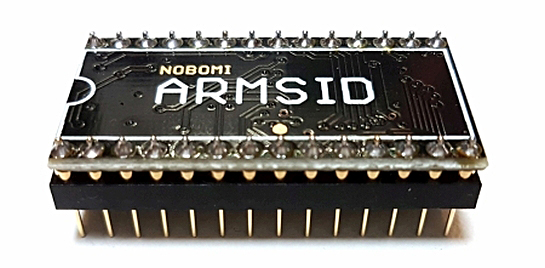
A new firmware update for the ARMSiD has been released by Nobomi.
News features and fixes in FW 2.13:
- Further optimization of code speed and size. Also bus operations are faster, finally “paddles” are successfully read on NTSC machines even with the oldest HW versions of ARMSID (with components on top) !
- ARMSID start is also faster. Instead of hundreds of milliseconds, ARMSID is fully functional in less than 15 milliseconds after power-up !
- Added the possibility to “fix” the so-called ADSR bug, i.e. a bug in the envelope generator, which is inherent to the original chips and is reproduced in ARMSID too. This is not needed in the C64 for compatibility reasons, but if you use ARMSID in synthesizers, you might be interested in this feature.
- Slightly modified quality (Q) of filter circuits for even more faithful reproduction of MOS8580.
Download: ARMSiD v2.13 (694)
source: nobomi.cz

The return of the Hybrid Sid Player by xAD/Nightfall & Gianluca Renzi (RetroBit Lab)
Based on the Project and Hardware Schematic by Markus Gritsch released in the years 2011-2015 on the forum dangerousprototypes. Thanks Markus.
Changelog:
v1.16 – 29/11/2021
Updated:
- Illegal/undocumented opcodes to the CPU Emulator:
- LAE (LAS/LAR) Combinations of STA/TXS and LDA/TSX.
- ANE (XAA) Combination of an immediate and an implied command.
- All 6502/6510 instructions have been implemented.
- Increased the maximum number of files per directory from 512 max to 800 max.
- Improved delay routine for read/write eeprom via I2c bitbang, it should now be compatible with all levels of the XC32 compiler code optimization.
- Replaced and splitted the Splash Screen Logo during the boot. Thanks to Federico di dato for the Retrobit LAB logo.
Fixed:
- The BRK opcode, opcode that will probably will never used in our case.
- Missing +2 Machine Cycle Times for the opcodes: BPL,BMI,BVC,BVS,BCC,BCS,BNE,BEQ due to some previous performance improvment of the 6502/6510 emulator code, i was probably drunk, indeed, i’m sure. %-)
- The clock “|CIA|” was displayed mistakenly when you choose to play a file in DMP format but this is wrong because the DMP file format doesn’t support the information of clock used (VBI/CIA) in the file header.
- The previous and next button did not work if there are only two files (SID or DMP) available to play in the folder.
- Incorrect Machine Cycle Times for the NOP opcode, four times instead of two. %-)
- Sometimes the version number displayed during boot would pop outside from the right side of the oled screen.
- Wrong Machine Cycle Times for the SLO, SRE(LSE), DCP, RLA, ISC(ISB) Illegal/undocumented opcodes with Indexed-indirect addressing of X,Y-Registers.

Ikari has released a new firmware for the SD2Snes Flash Cartridge (Super Nintendo/Famicom). The upgrade instructions can be found here.
Sorry for the delay, but it just escaped me to post it here.
Features added:
- [All] USB (usb2snes) support by RedGuy
- [All] save state support (via USB/savestate2snes) by RedGuy
- [All] stand-alone save state features by FURiOUS
- [All] some compatibility improvements and optimizations for stand-alone save states by ikari_01
- Add support for YAML list items for multiple savestate_fixes entries per game
- Add support for simple bitwise operations on savestate_fixes patches
- Add support for verbatim code execution on savestate_fixes patches – notably fixes Star Ocean (decompressed) save states (however the save state hook still needs CPU time optimization to prevent music glitches in Star Ocean.)
- Add IRQ support on top of NMI for the save state hook – this enables save states on Out Of This World and possibly other games that only use IRQ. Also fixes controller input capture on a number of games so the game-specific input hacks could be eliminated.
- Moved save state code outside of the USB hook area to make room for USB hook execution.
- [All] SGB support by Redacted173.
- [All] favorite games list by freelancer42
Fixes:
- [All] Fixed data caching bug in MSU1 data extension which could cause wrong data to be streamed
- [All] Savestates: do not try to capture data that is already in cartridge space anyway (e.g. SRAM). Fixes text distortion in Near’s Bahamut Lagoon translation when loading a state.
- [All] Fixed YAML config parser to support comment signs after list start items
- [All] Fixed SNES open-bus contamination (fixes sprite flickering in Near’s Bahamut Lagoon translation, certain speed runs that rely on open bus behaviour)
- [All] (hopefully) fixed rapid data line toggling sometimes resulting in address line glitches, causing random crashes in extreme cases, and occasional garbled graphics on SMRPG among others
- [All] Fixed data integrity problems when loading BSX games
Download:
source: sd2snes.de

The return of the Hybrid Sid Player by xAD/Nightfall & Gianluca Renzi (RetroBit Lab)
Based on the Project and Hardware Schematic by Markus Gritsch released in the years 2011-2015 on the forum dangerousprototypes. Thanks Markus.
Changelog:
v1.15 – 26/9/2021
Updated:
- Slightly improved the CIA timing, now the SID tune “https://hvsc.csdb.dk/MUSICIANS/P/Page_Jason/25_Hurts.sid” and probably some others they sounds fairly well without “clicking/noise/beeping” in some parts of the song. *
- Slightly improved the VBI timing, now the SID tune “https://hvsc.csdb.dk/MUSICIANS/S/Stinsen/Freeloader.sid” and probably some others they sounds fairly well without “clicking/noise/beeping” in some parts of the song. *
- When the (Auto/Random/Intro) MODE is used the brightness of the oled is restored on each change of music until the default timeout is reached.
* I’ll never stop saying we are far away from my personal feeling of absolute perfection but sound ok for 90% of peoples, luckily there aren’t many SID sound purists :-D
Many people still think that a SID played with a SID emulator on a Mobile Phone or PC sounds absolutely identical to the one played with the SID in the original hardware version :-|
Fixed:


Recent Comments