 This site is about recreating gaming hardware from the past in modern programmable devices, known as FPGAs.
source: fpgaarcade.com
 The High Voltage SID Collection (HVSC) is a freeware hobby project which organises Commodore 64 music (also known as SID music) into an archive for both musicians and fans alike.
The work on the collection is done completely in the Team and contributors’ spare time and is proudly one of the largest and most accurate computer music collections known.
This update features (all approximates):
- 804 new SIDs (62 2SIDs)
- 113 fixed/better rips.
- 4 PlaySID/Sidplay1 specific SIDs eliminated.
- 30 repeats/bad rips eliminated.
- 742 SID credit fixes.
- 176 SID model/clock infos.
- 16 tunes from /DEMOS/UNKNOWN/ identified.
- 4 tunes from /GAMES/ identified.
- 36 tunes moved out of /DEMOS/ to their composers’ directories.
- 2 tunes moved out of /GAMES/ to their composers’ directories.
Download: High Voltage SID Collection Update #55 (full) (1442)
Download: High Voltage PSID Collection Update #55 (1336)
source: www.hvsc.c64.org
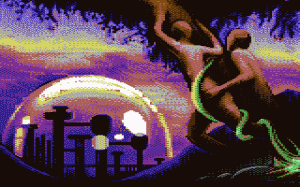 Erich/Unlimited has released a new issue of the Botticelli Bilderdisk. It’s two disk-sides of pictures in Botticelli format, using the Magica viewer.
The quality and theme of the pictures is quite varied: you’ll find many things from hand-pixelled scenes to digitized stills.
Download: Botticelli Bilderdisk #36 (960)
source: plus4world.powweb.com
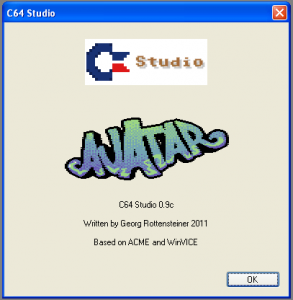 C64 Studio is a .NET based IDE written by Georg Rottensteiner.
This app supports project based C64 assembly. The internal assembler is using the ACME syntax.
In connection with Vice the IDE allows you to debug through your code and watch variables/memory locations, registers and memory.
Any other emulator can be set up as well if it’s startable via runtime arguments. C64 Studio allows you to compile to raw binary, .prg, .t64 or cartridge format (.bin and .crt for 8k and 16k).
Additionally to this C64 Studio comes with a charset and sprite editor.
Version history:
21.06.2011 – 1.3a:
- Fixed weird exception when using Umlauts at the line end.
- Added tab configuration.
- Added undo/redo to toolbar/menu.
- Autocreate project if new document is created without project.
19.06.2011 – 1.3:
- Added image export for sprites.
- Fixed wrong modified state in sprite editor (selecting single/multi-color chars would set the project as modified)
- Added import/export of all sprites as image.
- Added import/export of all characters as image.
- Added pseudo pc macro.
- Added project configurations with predefines.
- Added element dependencies.
- Enabled sprite/charset files as part of projects.
- Added !ifndef macro.
Download: C64Studio v1.3a Beta (949)
source: lemon64.com
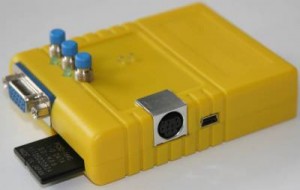 Turbo Chameleon 64 is an extremely user-friendly cartridge that can be used without opening the computer. It is just plugged to the expansion port of the C64.
The Turbo Chameleon 64 cartridge can also be operated as a stand-alone unit (since it’s basically an FPGA computer like the C-One or the Minimig in a C64 cartridge case), replacing the computer, the floppy drive and the heavy power supply.
When used as a stand-alone unit, a USB power adapter or active USB hub can be used as a power source.
Changelog:
Differences from Beta-5b to Beta-6:
- Fixed RAM mirrors for 1541 drive emulation.
- Fixed reading from emulated SID.
- New cartridge emulations.
- Disk track lengths set to 6256, 6672, 7144 or 7696 bytes.
- Implemented disk-change with button.
- Input latch emulation in VIA emulation.
- Implemented SDR register in CIA.
- Implemented real IEC bus disable bit.
- VIC-II timing fixed for mode bits (MCM, BMM and ECM)
Differences from Beta-6 to Beta-6b:
- 1541 emulation: fixed IEC timing. All known speedloader problems are gone now.
- 1541 emulation: VIA6522 timer fixes.
- 1541 emulation: VIA6522 register r/w fixes.
- New cartridge emulations.
Differences from Beta-6b to Beta-6c:
- Auto speed option for turbo feature. Slows down on IEC bus accesses.
- PS/2 Page up/Page down alias for F1, F7. Easier navigation in the File-Browser.
Download: Turbo Chameleon 64 beta firmware v6c (1787)
source: syntiac.com
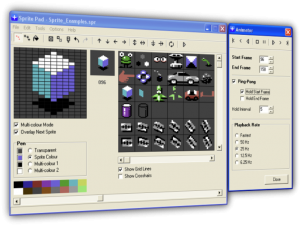 Subchrist has updated his Sprite Editor for Commodore 64. Sprite Pad is a free cross-platform development tool for designing sprite images and animations.
Improvements and changes in this version:
- Version 1.8.1 adds sprite swap using right mouse button and fixes some bugs with the new quantity control.
General Program Features:
- Edit and animate multicolour and high-resolution sprite images.
- Rotations. A World first?, Free rotate with variable angle limiter, auto-generate rotation sequences in any mode with 1 degree accuracy.
- Overlays. Allows the designing of 2 sprites as one + animation and rotation support!.
- Multiple Palettes. User editable palette file supports up to 20 additional palettes. (Default palette is now technically accurate).
System Requirements:
- The program has been designed, programmed and tested on a 32-bit Windows XP (SP3) system.
- The development machine has an Athlon XP 2400+ (2Ghz) with 512MB of RAM and an old 64MB Nvidia Geforce4 MX GFX card.
Download: Sprite Pad v1.8.1 (1176)
source: subchrist homepage
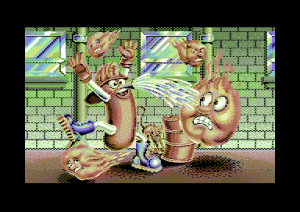 This is a very nice conversion of the arcade game Mappy from Namco for Commodore 64. Thanks to Encore of Undone for this game.
Download: Frantic Freddy (1628)
source: noname.c64.org
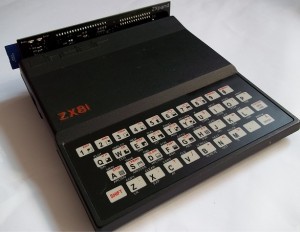 The ZXpand interface is a brand new interface for the Sinclair ZX81, and Timex-Sinclair TS/1000 Home Computers.
The ZXpand interface offers 32K of expanded memory (which is configurable to support various hi-resolution graphics modes), instant file access to .p files stored on SD memory cards and more.
The Sinclair ZX81 ZXpand interface will also allow you to connect an Atari style 9 pin joystick port to play either specially written or specially adapted games.
The ZXpand provides the following facilities:
- SD Memory Card reader – for instant loading from / saving to .p files (used by ZX81 emulators)
- 32K of configurable RAM memory, which can then be set up to use the various hi-resolution graphics schemes for the Sinclair ZX81.
- New keywords are added to the system ROM to allow you to load and save programs, produce a catalogue of files on the memory
card, configure the ZXpand Interface, and delete files.
- You can still load programs from cassette as well as using the interface, to allow you to copy files onto the SD memory card.
- Sub-directories are supported on the memory card.
- The new ROM can be switched off once a program is loaded, in order to allow access to LPRINT, LLIST and COPY commands.
- There is a built in reset button to reset the ZX81 without having to pull the power lead.
Download: ZXpand Manual (2638)
source: rwapsoftware.co.uk
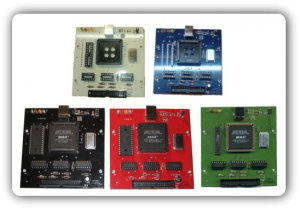 The HxC Floppy Drive Emulator is a software and hardware system created by jfdn aka Jeff.
The aim of this project is to replace the floppy disk drive by an electronic device emulating the floppy disk drive (list of supported Computer/Hardware).
There are two differents emulators:
- A USB version which allows to connect the floppy disk drive interface of the computer to a PC via a USB cable.
- A SDCARD version which allows to emulate floppy disks which images are stored in a SDCARD.
Release notes for the HxCFloppyEmulator software v1.6.9.0:
- New files Support : Kurzweil KRZ file support.
- New files Support : EDE EDM (Ensoniq Mirage) file image support.
- A new “About” window ;).
- … full release notes here
Download: HxCFloppyEmulator software v1.6.9.0 (1112)
source: hxc2001.free.fr
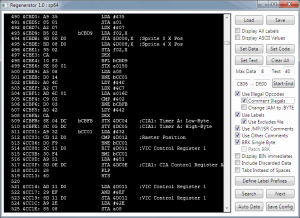 Regenerator is an interactive disassembler for C64 binaries. Regenerator will load any standard C64 .PRG file (or VICE snapshot) and disassemble it for your convenience.
There are a few options you can choose to change the output and a few tools to make the output look better and more useful to programmers. Regenerator runs under M$ windows and need .net 3.5 (or 4.0) runtime.
Download: Regenerator v1.0 by n0stalgia (1562)
source: noname.c64.org
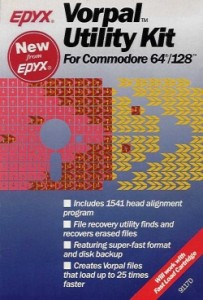 The Vorpal save and load utilities are for placing user-created files and programs in a special fast-loading format.
Unlike the Fast Load Cartridge from Epyx, the Vorpal fast loading feature will not speed the loading of “off-the-shelf” programs and games purchased from software manufacturers.
Includes powerful utilities for Commodore 64/128.
- 1541 Head Alignment: Head Alignment Utility puts most 1541 disk drives back on track.
- File Recovery Utility: Finds and recovers files that were erased by mistake.
- Super-Fast Disk Format: Epyx’s own format utility formats disks in approximately 25 seconds. Normal formatting time is almost 2 minutes.
- Super-Fast File Backup: Fast file backup utility recognizes many different file formats including relative and Vorpal files.
- Super-Fast Disk Backups: High speed disk backup can duplicate a disk in a fraction of the time it normally takes.
- Disk Drive Speed Check: Diagnostic utility monitors the performance of Commodore 1541 and 1571 disk drives.
- Vorpal* Save/Load: Special Vorpal save and load utilities place user-created files and programs in Vorpal format. Files and programs load up to 25 times faster than normal.
Download: Vorpal Utility Kit (1570)
source: elisoftware.org noname.c64.org
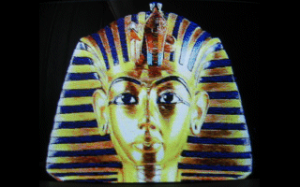 This is a new graphics-mode for the Commodore 128 with 64KB VDC RAM.
There are two Video modes, one is called: VDC-IHFLI (640×480 pixels) and the other one is: VDC-FLI (480×252 pixels).
The archive contain the software (converter) for M$ Windows and some demos.
Download: VDC-IHFLI Converter & Demo (1194)
Download: VDC-FLI Converter & Demo (1055)
source: noname.c64.org
 Onslaught / Wrath Designs / Vandalism, bring to you the 56th issue of the Vandalism News.
Download: Vandalism News #56 (1132)
source: noname.c64.org
Subchrist has updated his Sprite Editor for Commodore 64. Sprite Pad is a free cross-platform development tool for designing sprite images and animations.
Improvements and changes in this version:
- Added single file projects (spd format)
- Added VICE snapshot ripper.
- Expanded browser window from 6×6 (36) to 8×7 (56) sprites.
- Added quantity control.
- Removed horizontal scroll from the browser as it was fiddly to navigate.
- Set default palette order back to standard to improve colour identification.
- Added Import/Export options with support for SEUCK/PRG files.
General Program Features:
- Edit and animate multicolour and high-resolution sprite images.
- Rotations. A World first?, Free rotate with variable angle limiter, auto-generate rotation sequences in any mode with 1 degree accuracy.
- Overlays. Allows the designing of 2 sprites as one + animation and rotation support!.
- Multiple Palettes. User editable palette file supports up to 20 additional palettes. (Default palette is now technically accurate).
System Requirements:
- The program has been designed, programmed and tested on a 32-bit Windows XP (SP3) system.
- The development machine has an Athlon XP 2400+ (2Ghz) with 512MB of RAM and an old 64MB Nvidia Geforce4 MX GFX card.
Download: Sprite Pad v1.8 (1116)
source: subchrist homepage
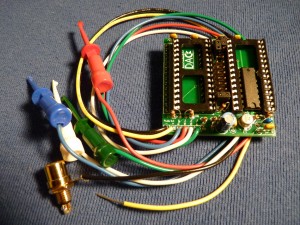 This is a compact, feature-filled dual-SID board, designed to provide a proper way to mount a second SID inside your C64 or C128 without resorting to the old piggyback hack.
Variations available to fit most C64 and C128 computers. Second SID can be placed at any 32-byte boundary from $DE00 to $DFE0, and it works in the $D420-$D4E0 range also. C128/C128-D users can also use $D700-$D7E0.
Easy no-solder installation – just move your computer’s SID chip onto the Stereo SID board, plug it into the motherboard SID socket, and connect a few micro-hook clips.
source: digitalaudioconcepts.com


Recent Comments